Dressmaker Beginner Guide: Make Your First Dress
Follow a Dressmaker commission from its brief to the finished dress: plan the shape, check fit, cut panels, sew seams and review before handing it in.
How do you read this screen?
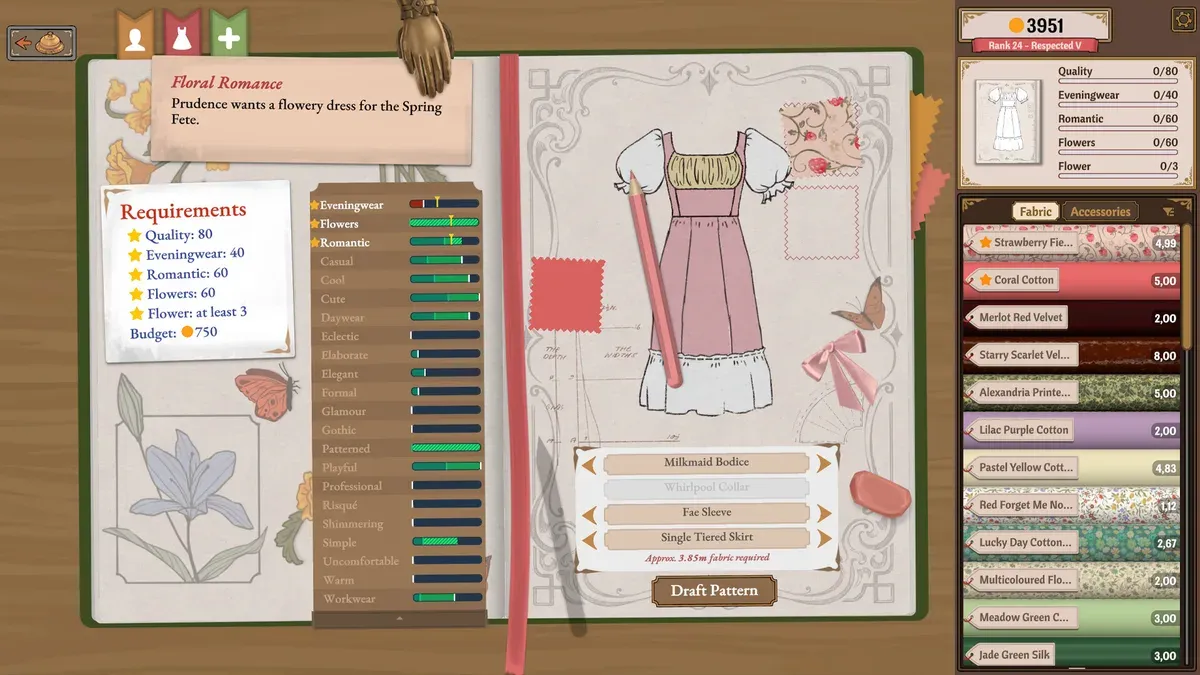
Official Steam promotional screenshot, with editorial markers. Its values illustrate the interface; they are not your save or a current-build playtest.
- 1Start with the Requirements card on the left.
- 2The right panel tracks the current garment against targets; the drawing alone is not a completed result.
- 3Draft Pattern sits below the component choices; review the design before drafting.
What is the first-dress workflow?
- Take a customer project in the shop. Build 403 documents ringing the bell to summon the next customer.
- Read each condition using the commission checklist: quality, tags and accessories are separate checks.
- Confirm the client and dimensions with the measurement guide.
- Choose components in the sketchbook and plan panel materials before Draft Pattern.
- Check each cutting piece’s grain indicator, send needed pieces to inventory and inspect placement on the mannequin.
- Follow the sewing control reference, then check decorations against the brief.
- At completion, distinguish finishing a commission, continuing work and selling the dress.
What does Prudence’s example actually require?
The official Floral Romance screenshot lists Quality 80, Eveningwear 40, Romantic 60, Flowers 60 and Flower: at least 3, with a budget of 750. Flowers is a tag requirement; Flower is a counted accessory condition. A floral appearance alone does not establish that both are satisfied.
The right panel still shows values such as 0/80 and 0/40. This is a planning image, not our successful commission result. Your first brief, budget and unlocked components may differ.
How do you decide whether to hand it in?
Compare the original brief with the current garment. If completion is unavailable, use the missing-panel checklist. If completion is offered but a requirement remains unmet, inspect the Continue Working option before proceeding. Build 403 records a payment fix for accepted commissions; compare your version before diagnosing that issue.
Where can you verify the game’s actual features?
The Steam store and publisher press kit describe the crafting stages. This page’s checklist is our suggested learning method; it does not claim hands-on testing or hidden scoring knowledge.
What should you learn next?
Before cutting, review the Commissions: read the brief before cutting and Measurements and mannequin fit. Use the Missing panels and a dress that will not finish when the project will not finish.
Screenshot evidence: official Steam product media, Cozy Lives / Free Lives.
Related Articles
guides
Dressmaker Cutting patterns and understanding grain
Inspect Dressmaker pattern arrows, per-panel grain indicators and fabric motif placement before cutting; keep grain quality separate from final dress quality.
guides
Dressmaker Sewing guide: a calm practice routine
Practise Dressmaker seams with a simple project: watch the needle path, control turns and pace, then compare the same difficult section on your next attempt.
guides
Dressmaker Commissions: read the brief before cutting
Read Dressmaker commission targets correctly: distinguish minimums and limits, flower style tags and counted accessories, then check the brief before cutting.
Was this helpful?
Thanks for the feedback!