Dressmaker 100% Quality Guide: Fit, Grain & Sewing
Troubleshoot Dressmaker 100% quality by comparing fit, panel grain and sewing stages; record one changed variable at a time instead of guessing score weights.
Official facts and community observations labelled separately. Reviewed 9 October 2026.
What is the confirmed goal?
The Steam achievement list includes a 100%-quality dress objective. It is an exact completion goal. A client liking the appearance and the dress reaching that quality value should be treated as separate checks.
How can you locate the problem?
Take a screenshot of the quality display after each major stage. Compare attempts with only one deliberate change.
| Observation | What to inspect next |
|---|---|
| Shortfall before sewing | Fit setup and assembled pieces |
| Drop during a stitch | That seam and speed |
| High quality but rejected requirement | The brief, not only quality |
| Different results across editions | Build and edition |
This is an editorial diagnostic flow, not a reverse-engineered scoring formula.
How do you read this screen?
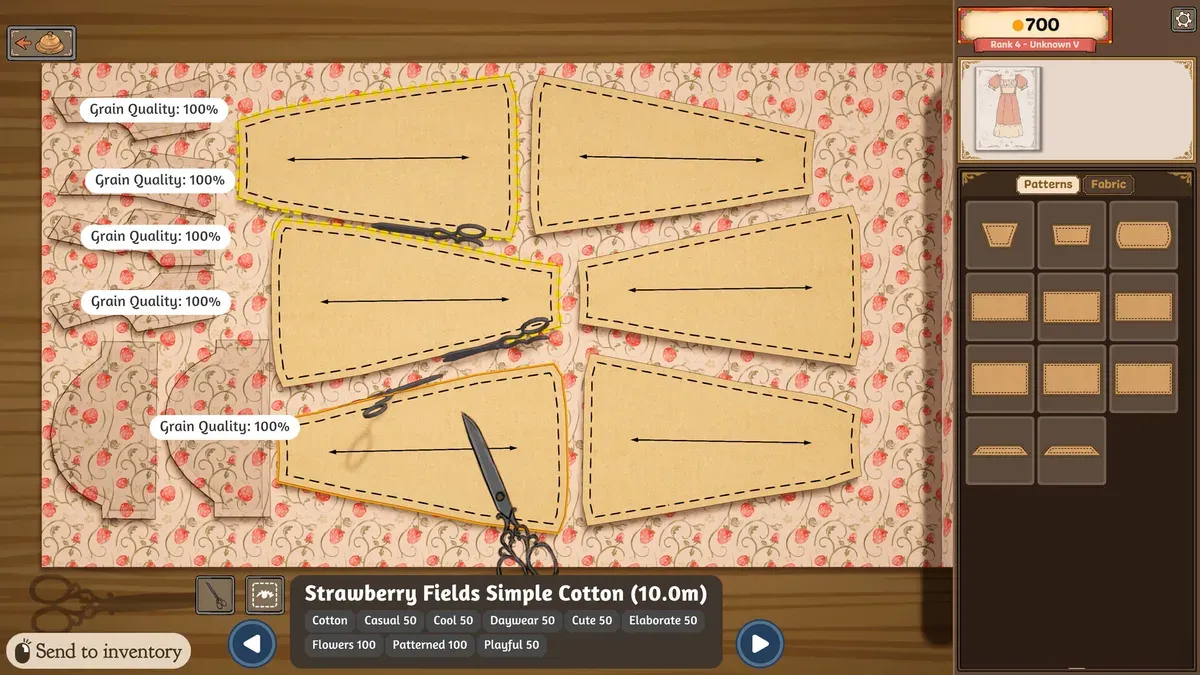
Official Steam promotional screenshot, with editorial markers. Its values illustrate the interface; they are not your save or a current-build playtest.
- 1Grain Quality refers to panel grain, not the finished dress’s overall quality.
- 2Double-headed arrows help identify the pattern’s direction.
- 3Send to inventory is the cutting-stage inventory prompt.
Why is 100% grain not the same as 100% dress quality?
The screenshot labels individual pieces Grain Quality: 100%. It establishes a cutting-stage indication, not completion of the overall quality achievement. Player guides also discuss measuring and sewing. Keep stage observations separate instead of treating one displayed number as the finished result.
What should you record after an unsuccessful attempt?
| Record | Keep from this attempt | Change next time |
|---|---|---|
| Client and fit | Mannequin dimensions and image | Check the same client’s dimensions |
| Cutting | Every grain indicator | One pattern orientation |
| Sewing | Difficult route and speed | The same seam’s handling |
| Result | Final quality and Steam status | One stage while preserving the rest |
This is an editorial comparison sheet, not an official weight formula. Changing the client, shape, fabric and speed together makes diagnosis much harder.
Example: every piece shows full grain, but no achievement. What next?
This is a hypothetical diagnosis, not our observed failed run. Keep cutting and result images, confirm that the Steam condition refers to overall dress quality, and review fit and seams. Consider the player warning about display rounding as a report rather than an official tolerance. Keep the shape and materials consistent in the next comparison.
What do completionist players recommend?
A Steam completionist guide advises checking measurements, grain and stitching together. It also warns that a rounded fit display may conceal a small mismatch. That is community evidence, not a developer-published tolerance; do not promise that one copied number always unlocks the achievement.
Is a bigger or more expensive design required?
The official objective specifies quality, not a minimum accessory bill. Start with a project you can inspect easily. Treat elaborate decoration as a separate creative goal.
What should you read next?
- Measurements and mannequin fit
- Cutting patterns and understanding grain
- All 32 Steam achievements: names and visible conditions
Sources and evidence
Player observations should be checked against your installed build. Editorial checklists are not guarantees of perfect scores or universal unlock behaviour.
Screenshot evidence: official Steam product media, Cozy Lives / Free Lives.
Related Articles
achievements
Dressmaker Achievements: All 32 Names & Conditions
Track all 32 Dressmaker Steam achievements with visible conditions and hidden entries marked; group quality, commission, cost and trim goals when planning attempts.
achievements
Dressmaker Completionist plan and the missable dialogue warning
Plan Dressmaker achievement projects around exact thresholds, reuse a comparison log and read the spoiler-labelled community warning about a dialogue choice.
characters
Dressmaker Customer Preferences & Measurements: All 10
Look up Dressmaker customer style preferences and community measurements, then compare them with the current brief; personal favourites do not replace requirements.
Was this helpful?
Thanks for the feedback!