Dressmaker cutting: check grain and print placement
If the print looks wrong on the finished dress, check two different decisions: grain direction and where the motif sits on the panel. The grain indicator helps with.
Cutting: check grain and print placement
If the print looks wrong on the finished dress, check two different decisions: grain direction and where the motif sits on the panel. The grain indicator helps with the first. You still need to compare the print itself for the second.
Check arrows, readings and the fabric beneath
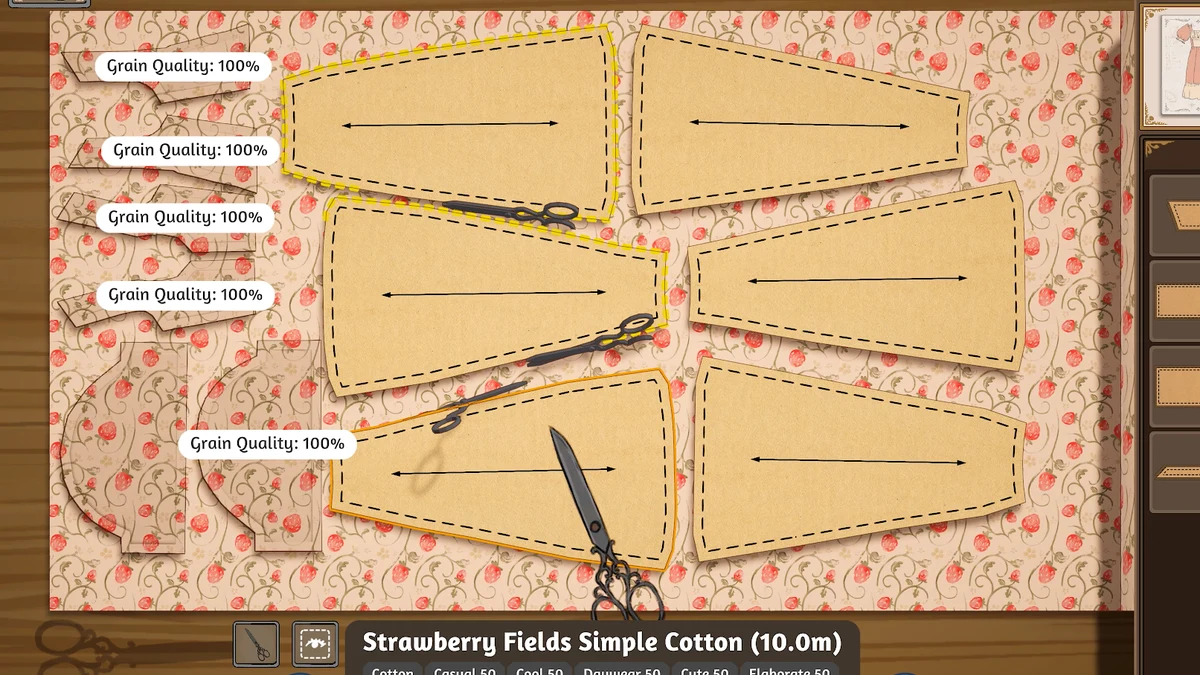
Image: official Cozy Lives / Free Lives media.
Look at the arrows inside the patterns, each panel’s Grain Quality and the printed fabric beneath it. The official description confirms that your arrangement carries through to the garment. Compare paired pieces when you want symmetry, or make sure a contrasting panel is a deliberate choice.
A grain reading is one stage of the project
The displayed Grain Quality belongs to individual panels. Even a full reading on every piece does not establish overall dress quality or promise a continuous print at every seam. Fit and stitching still need their own review.
Make one change you can trace
Note the panel you are moving and keep an image of the cutting layout. Compare it with the mannequin preview, then adjust one piece at a time. Changing the shape, fabric and orientation together makes the next result much harder to explain.
Use the editing controls in your installed build. Older prototype videos can offer design ideas, but their shortcuts may differ.
Where to go next
- Dressmaker beginner guide: finish your first dress
- Dressmaker fabrics: choose for the brief and the design
- Dressmaker Steam or prototype? Choose the right edition
Sources and version
Reviewed on 9 October 2026. Player observations are identified in the guide; check controls against your installed version.
Related Articles
guides
Dressmaker beginner guide: finish your first dress
The sketchbook gives you a lot of choices at once. You do not need to make your most elaborate gown on your first commission. A better first goal is to carry one.
guides
Dressmaker sewing practice: work on one difficult turn
If the needle drifts at a turn, narrow the problem to that seam. Was the route hard to read, the turn late, or the speed too demanding? Watching those separately is.
guides
Dressmaker commission rejected? Check targets and limits
A dress can look lovely and still miss a commission. That feels frustrating, but the next useful step is to find the unmet condition. Keep appearance, quality.
Was this helpful?
Thanks for the feedback!